on programmatic tool calling
Last month anthropic published an article about having their models better use tools. They mention these three techniques:
- Tool Search Tool, which allows Claude to use search tools to access thousands of tools without consuming its context window
- Programmatic Tool Calling, which allows Claude to invoke tools in a code execution environment reducing the impact on the model’s context window
- Tool Use Examples, which provides a universal standard for demonstrating how to effectively use a given tool
At the time the article went out, I did not really put much thought into it, until [Theo made a video calling them out for not acknowledging their failure on MCP](https://www.youtube.com/watch?v=hPPTrsUzLA8). I generally agree with him, but he mentions something particularly interesting: models are so much smarter when you let them write some code.
And it makes total sense! These models have been trained on large amounts of code, so they can easily transform what the user wants into a program that can be run. And there’s evidence: Vercel recently reported a 100% success rate on their text-to-SQL agent by letting the model write code instead of using traditional tool calls.
Now, this got me thinking for a bit. How far can we push this idea? Code can encode highly complex behaviour into seemingly short programs. Take the example of the classic donut.c:
            k;double sin()
         ,cos();main(){float A=
       0,B=0,i,j,z[1760];char b[
     1760];printf("\x1b[2J");for(;;
  ){memset(b,32,1760);memset(z,0,7040)
  ;for(j=0;6.28>j;j+=0.07)for(i=0;6.28
 >i;i+=0.02){float c=sin(i),d=cos(j),e=
 sin(A),f=sin(j),g=cos(A),h=d+2,D=1/(c*
 h*e+f*g+5),l=cos      (i),m=cos(B),n=s\
in(B),t=c*h*g-f*        e;int x=40+30*D*
(l*h*m-t*n),y=            12+15*D*(l*h*n
+t*m),o=x+80*y,          N=8*((f*e-c*d*g
 )*m-c*d*e-f*g-l        *d*n);if(22>y&&
 y>0&&x>0&&80>x&&D>z[o]){z[o]=D;;;b[o]=
 ".,-~:;=!*#$@"[N>0?N:0];}}/*#****!!-*/
  printf("\x1b[H");for(k=0;1761>k;k++)
   putchar(k%80?b[k]:10);A+=0.04;B+=
     0.02;usleep(16000);}}/*!!==::-
       .,~~;;;========;;;:~-.
             ..,--------,*/
On mac, if you compile this with:
cc donut.c -o donut -lm -std=c89 -Wno-implicit-function-declaration -Wno-implicit-intYou will get this cute animation:
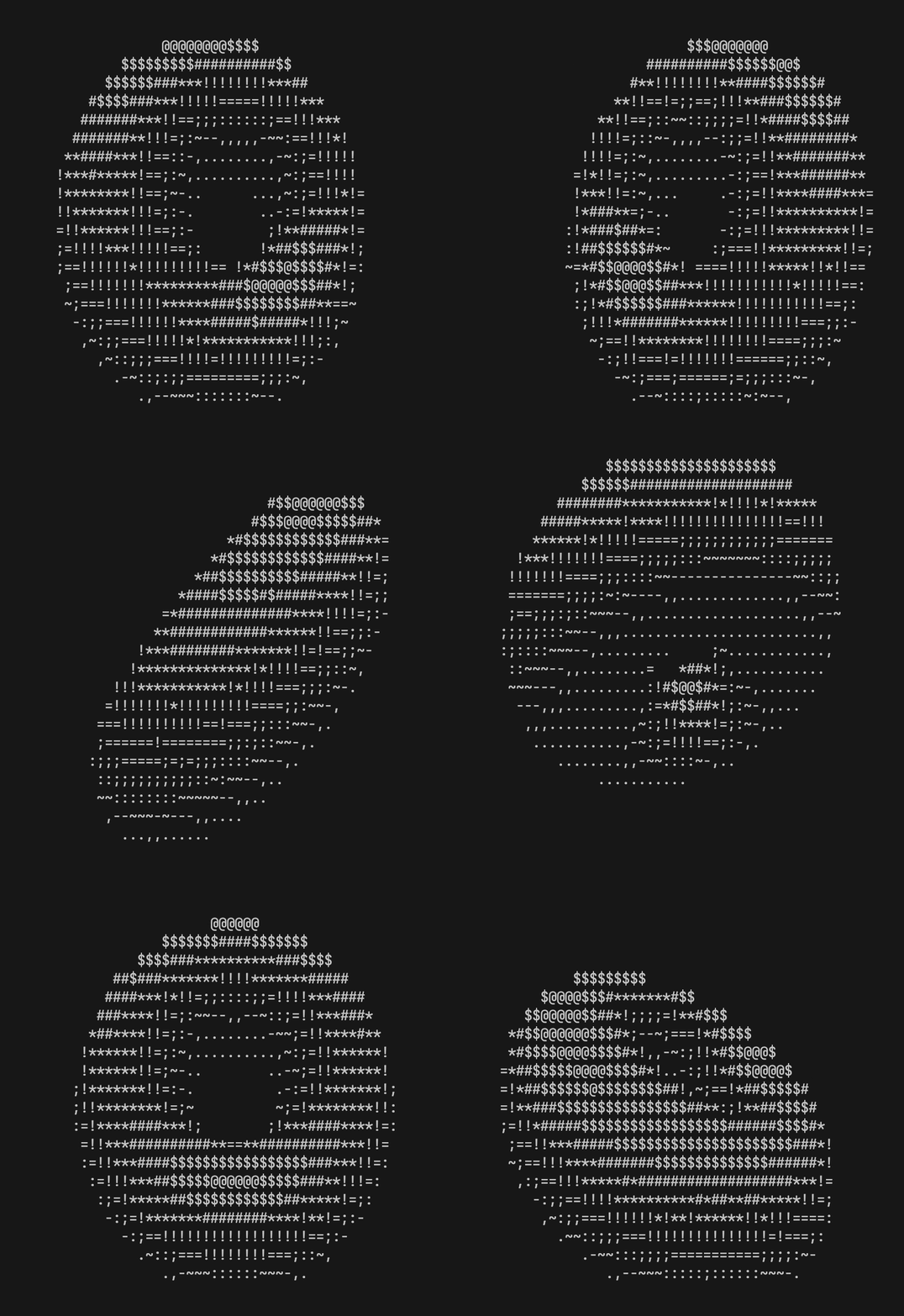
Seemingly concise code can create complex behaviour, deterministically. No matter how many times I compile and run donut.c, I will get the same result. Even better, an LLM can read the output of the program and improve upon it.
Let’s make an image editing agent
To test our approach, let’s use a well-known benchmark. There’s a popular LLM benchmark popularized by Simon Willison. The task is simple: draw a pelican from an SVG.
Simon reports gpt-5.2 having a good result:
Input:
Generate an SVG of a pelican riding a bicycleOutput:

And a more advanced task:
Input:
Generate an SVG of a California brown pelican riding a bicycle. The
bicycle must have spokes and a correctly shaped bicycle frame. The pelican must
have its characteristic large pouch, and there should be a clear indication of
feathers.  The pelican must be clearly pedaling the bicycle. The image should
show the full breeding plumage of the California brown pelican.
Output:
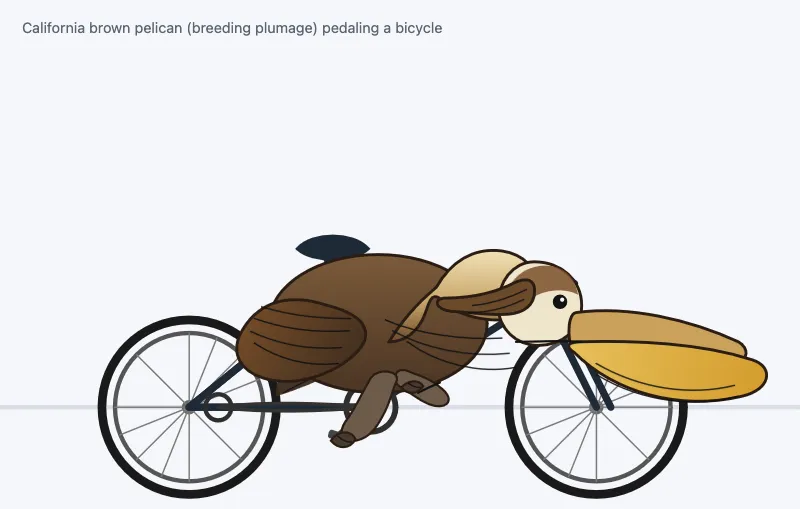
These generations are quite incredible, but can we improve this?
Let’s have a look!
For this example we will use typescript, bun, the AI SDK and the node sharp image processing library.
The way that we are going to do this is by first defining the interfaces that the LLM can use. I don’t really know much about graphics programming, but I know that to draw stuff you need to paint some lines and rectangles. Here’s the interface:
/**
 * Simple Image Editor API for generating images programmatically.
 *
 * The `ctx` object is available in your code.
 * All coordinates are in pixels. Canvas is 512x512 by default.
 * Origin (0,0) is TOP-LEFT. X increases rightward, Y increases downward.
 * All methods are sync and chainable (return `this`).
 *
 * @example
 * ```javascript
 * // Create a simple icon with layered shapes
 * ctx
 *   .rect(0, 0, 100, 100, { fill: '#1e40af' })
 *   .layer()
 *   .circle(50, 50, 30, { fill: '#fff' })
 *   .layer()
 *   .text('A', 50, 50, { fill: '#1e40af', size: 24, weight: 700 })
 * ```
 */

export type Point = [number, number]

export interface BaseOpts {
    fill?: string
    stroke?: string
    strokeWidth?: number
    opacity?: number
}

export interface RectOpts extends BaseOpts {
    borderRadius?: number
}

export interface ShapeOpts extends BaseOpts {}

export interface LineOpts {
    stroke: string
    width: number
    opacity?: number
}

export interface PathOpts extends BaseOpts {
    /** Whether to close the path */
    closed?: boolean
}

export interface TextOpts {
    fill?: string
    /** Font family, e.g., 'Arial', 'Inter' */
    font?: string
    /** Font size in pixels */
    size?: number
    /** Font weight, e.g., 400, 700 */
    weight?: number
    opacity?: number
}

export interface DrawingContext {
    /**
     * Draw a rectangle
     * @param x - X coordinate of top-left corner
     * @param y - Y coordinate of top-left corner
     * @param width - Width in pixels
     * @param height - Height in pixels
     */
    rect(x: number, y: number, width: number, height: number, opts?: RectOpts): this

    /**
     * Draw a circle
     * @param x - X coordinate of center
     * @param y - Y coordinate of center
     * @param radius - Radius in pixels
     */
    circle(x: number, y: number, radius: number, opts?: ShapeOpts): this

    /**
     * Draw a triangle defined by three points
     */
    triangle(
        x1: number,
        y1: number,
        x2: number,
        y2: number,
        x3: number,
        y3: number,
        opts?: ShapeOpts,
    ): this

    /**
     * Draw a line between two points
     */
    line(x1: number, y1: number, x2: number, y2: number, opts?: LineOpts): this

    /**
     * Draw a path from connected points
     * @param points - Array of [x, y] coordinates
     */
    path(points: Point[], opts?: PathOpts): this

    /**
     * Draw an arc (partial circle)
     * @param x - X coordinate of center
     * @param y - Y coordinate of center
     * @param radius - Radius in pixels
     * @param startAngle - Start angle in degrees (0 = right, 90 = bottom)
     * @param endAngle - End angle in degrees
     */
    arc(
        x: number,
        y: number,
        radius: number,
        startAngle: number,
        endAngle: number,
        opts?: ShapeOpts,
    ): this

    /**
     * Draw text
     * @param content - Text content
     * @param x - X coordinate (center)
     * @param y - Y coordinate (center)
     */
    text(content: string, x: number, y: number, opts?: TextOpts): this

    /**
     * Move to next layer. Higher layers render on top of lower layers.
     */
    layer(): this
}
The interface has method definitions, code examples, and JSDoc comments, all in plain TypeScript. LLMs already understand code from pretraining. They don’t need tool-calling fine-tuning to read a TypeScript interface.
There’s no JSON schema to define. No zod validators, no tool descriptions in a separate format. Just readable code that you can type-check, syntax-highlight, and refactor. I suspect this also improves model performance, though I haven’t benchmarked it.
We can implement the defined interfaces in our code as follows:
import sharp from 'sharp'
import type {
DrawingContext,
LineOpts,
PathOpts,
Point,
RectOpts,
ShapeOpts,
TextOpts,
} from './interface'
interface Element {
layer: number
svg: string
}
class DrawingContextImpl implements DrawingContext {
private elements: Element[] = []
private currentLayer = 0
private canvasSize: number
constructor(size = 512) {
this.canvasSize = size
}
rect(x: number, y: number, width: number, height: number, opts?: RectOpts): this {
const fill = opts?.fill ?? 'transparent'
const stroke = opts?.stroke ?? 'none'
const strokeWidth = opts?.strokeWidth ?? 0
const opacity = opts?.opacity ?? 1
const borderRadius = opts?.borderRadius ?? 0
this.elements.push({
layer: this.currentLayer,
svg: `<rect x="${x}" y="${y}" width="${width}" height="${height}" fill="${fill}" stroke="${stroke}" stroke-width="${strokeWidth}" rx="${borderRadius}" opacity="${opacity}" />`,
})
return this
}
circle(x: number, y: number, radius: number, opts?: ShapeOpts): this {
const fill = opts?.fill ?? 'transparent'
const stroke = opts?.stroke ?? 'none'
const strokeWidth = opts?.strokeWidth ?? 0
const opacity = opts?.opacity ?? 1
this.elements.push({
layer: this.currentLayer,
svg: `<circle cx="${x}" cy="${y}" r="${radius}" fill="${fill}" stroke="${stroke}" stroke-width="${strokeWidth}" opacity="${opacity}" />`,
})
return this
}
triangle(
x1: number,
y1: number,
x2: number,
y2: number,
x3: number,
y3: number,
opts?: ShapeOpts,
): this {
const fill = opts?.fill ?? 'transparent'
const stroke = opts?.stroke ?? 'none'
const strokeWidth = opts?.strokeWidth ?? 0
const opacity = opts?.opacity ?? 1
this.elements.push({
layer: this.currentLayer,
svg: `<polygon points="${x1},${y1} ${x2},${y2} ${x3},${y3}" fill="${fill}" stroke="${stroke}" stroke-width="${strokeWidth}" opacity="${opacity}" />`,
})
return this
}
line(x1: number, y1: number, x2: number, y2: number, opts?: LineOpts): this {
const stroke = opts?.stroke ?? '#000'
const width = opts?.width ?? 1
const opacity = opts?.opacity ?? 1
this.elements.push({
layer: this.currentLayer,
svg: `<line x1="${x1}" y1="${y1}" x2="${x2}" y2="${y2}" stroke="${stroke}" stroke-width="${width}" opacity="${opacity}" />`,
})
return this
}
path(points: Point[], opts?: PathOpts): this {
if (points.length === 0) {
return this
}
const fill = opts?.fill ?? 'transparent'
const stroke = opts?.stroke ?? 'none'
const strokeWidth = opts?.strokeWidth ?? 0
const opacity = opts?.opacity ?? 1
const closed = opts?.closed ?? false
const [first, ...rest] = points
let d = `M ${first[0]},${first[1]}`
for (const point of rest) {
d += ` L ${point[0]},${point[1]}`
}
if (closed) {
d += ' Z'
}
this.elements.push({
layer: this.currentLayer,
svg: `<path d="${d}" fill="${fill}" stroke="${stroke}" stroke-width="${strokeWidth}" opacity="${opacity}" />`,
})
return this
}
arc(
x: number,
y: number,
radius: number,
startAngle: number,
endAngle: number,
opts?: ShapeOpts,
): this {
const fill = opts?.fill ?? 'transparent'
const stroke = opts?.stroke ?? 'none'
const strokeWidth = opts?.strokeWidth ?? 0
const opacity = opts?.opacity ?? 1
// Convert degrees to radians
const startRad = (startAngle * Math.PI) / 180
const endRad = (endAngle * Math.PI) / 180
// Calculate start and end points
const x1 = x + radius * Math.cos(startRad)
const y1 = y + radius * Math.sin(startRad)
const x2 = x + radius * Math.cos(endRad)
const y2 = y + radius * Math.sin(endRad)
// Determine if we need the large arc flag
const largeArcFlag = Math.abs(endAngle - startAngle) > 180 ? 1 : 0
const sweepFlag = endAngle > startAngle ? 1 : 0
const d = `M ${x},${y} L ${x1},${y1} A ${radius},${radius} 0 ${largeArcFlag},${sweepFlag} ${x2},${y2} Z`
this.elements.push({
layer: this.currentLayer,
svg: `<path d="${d}" fill="${fill}" stroke="${stroke}" stroke-width="${strokeWidth}" opacity="${opacity}" />`,
})
return this
}
text(content: string, x: number, y: number, opts?: TextOpts): this {
const fill = opts?.fill ?? '#000'
const font = opts?.font ?? 'Arial'
const size = opts?.size ?? 16
const weight = opts?.weight ?? 400
const opacity = opts?.opacity ?? 1
const escapedContent = content
.replace(/&/g, '&')
.replace(/</g, '<')
.replace(/>/g, '>')
this.elements.push({
layer: this.currentLayer,
svg: `<text x="${x}" y="${y}" font-family="${font}" font-size="${size}" font-weight="${weight}" fill="${fill}" opacity="${opacity}" text-anchor="middle" dominant-baseline="central">${escapedContent}</text>`,
})
return this
}
layer(): this {
this.currentLayer++
return this
}
toSVG(): string {
const sorted = [...this.elements].sort((a, b) => a.layer - b.layer)
return `<svg width="${this.canvasSize}" height="${this.canvasSize}" xmlns="http://www.w3.org/2000/svg">
${sorted.map((el) => el.svg).join('\n')}
</svg>`
}
async toPNG(size?: number): Promise<Buffer> {
const svg = this.toSVG()
const targetSize = size ?? this.canvasSize
return sharp(Buffer.from(svg)).resize(targetSize, targetSize).png().toBuffer()
}
}
export function createDrawingContext(size = 512): DrawingContext & {
toSVG(): string
toPNG(size?: number): Promise<Buffer>
} {
return new DrawingContextImpl(size)
}
export async function executeCode(code: string, canvasSize = 512): Promise<Buffer> {
const ctx = createDrawingContext(canvasSize)
const asyncFn = new Function('ctx', `return (async () => { ${code} })()`)
await asyncFn(ctx)
return ctx.toPNG()
}Now, for the most interesting part of the agent, the agent code! Thankfully the AI SDK makes this quite easy to write.
First, the model provider. We use gpt-5.2 wrapped with devtools middleware to track token usage:
import { devToolsMiddleware } from '@ai-sdk/devtools'
import { createOpenAI } from '@ai-sdk/openai'
import { wrapLanguageModel } from 'ai'

const openai = createOpenAI({
    apiKey: process.env.OPENAI_API_KEY,
})

export const gpt52 = wrapLanguageModel({
    model: openai.responses('gpt-5.2'),
    middleware: devToolsMiddleware(),
})
And the agent itself:
import { gpt52 } from '@/providers'
import { generateText, stepCountIs, tool } from 'ai'
import fs from 'node:fs/promises'
import { z } from 'zod'
import { executeCode } from './executor'
import interfaceDocs from './interface.ts' with { type: 'text' }

/**
 * Simple Image Editor Agent Algorithm:
 *
 * 1. Agent receives a description of the image to create
 * 2. Agent writes code using the DrawingContext API
 * 3. Code is executed to produce a PNG
 * 4. Result is shown to the agent
 * 5. If not satisfied, agent REWRITES the entire code
 * 6. Repeat until satisfied
 *
 * Each iteration: code → PNG
 * No mutable state between executions.
 */
export interface SimpleImageEditorOptions {
    /** Output filename (without extension). Defaults to 'output' */
    name?: string
    /** Canvas size in pixels. Defaults to 512 */
    canvasSize?: number
}

export async function simpleImageEditorAgent(
    instruction: string,
    options: SimpleImageEditorOptions = {},
) {
    const name = options.name ?? 'output'
    const canvasSize = options.canvasSize ?? 512

    const outputDir = './data'
    await fs.mkdir(outputDir, { recursive: true })
    let stepCount = 0

    const systemPrompt = `You are an image generation assistant. You write JavaScript code to create images using the DrawingContext API.

Canvas: ${canvasSize}x${canvasSize} pixels. Origin (0,0) is TOP-LEFT. X increases rightward, Y increases downward.

${interfaceDocs}

LAYERS:
- Use ctx.layer() to move to the next layer
- Higher layers render ON TOP of lower layers
- Example: background rect on layer 0, foreground circle on layer 1

WORKFLOW:
1. Plan the image composition (shapes, colors, layers)
2. Write code that creates the entire image
3. CRITICALLY examine the result - check positioning, colors, proportions
4. If ANYTHING is wrong, identify the issue and rewrite the code
5. Iterate until the result looks correct. Only then respond with a text summary.

COMMON PATTERNS:
- Outline shapes: use fill: 'transparent' with stroke and strokeWidth
- Layered composition: .rect(...).layer().circle(...).layer().text(...)
- Transparency: use rgba() or opacity option
- Rounded shapes: use borderRadius on rect()

RULES:
- Each execution starts fresh
- To fix anything, rewrite the entire code
- All methods are sync and chainable
- Use ctx.method() syntax (the ctx object is provided)`

    const result = await generateText({
        model: gpt52,
        system: systemPrompt,
        messages: [
            {
                role: 'user',
                content: instruction,
            },
        ],
        tools: {
            executeCode: tool({
                description:
                    'Execute JavaScript code to create an image using the DrawingContext API. Returns the generated image.',
                inputSchema: z.object({
                    code: z.string().describe('JavaScript code using the DrawingContext API'),
                }),
                execute: async ({ code }) => {
                    const buffer = await executeCode(code, canvasSize)
                    return { buffer, imageData: buffer.toString('base64') }
                },
                toModelOutput: (result) => ({
                    type: 'content',
                    value: [
                        { type: 'text', text: 'Code executed. Generated image:' },
                        {
                            type: 'media',
                            data: result.output.imageData,
                            mediaType: 'image/png',
                        },
                    ],
                }),
            }),
        },
        stopWhen: stepCountIs(10),
        onStepFinish: async ({ toolResults }) => {
            for (const result of toolResults ?? []) {
                if (result.toolName === 'executeCode') {
                    stepCount++
                    const stepPath = `${outputDir}/${name}.debug-${stepCount}.png`
                    const output = result.output as { buffer: Buffer }
                    await fs.writeFile(stepPath, output.buffer)
                    console.log(`[${name}] Step ${stepCount}: ${stepPath}`)
                }
            }
        },
    })

    console.log(`Final response: ${result.text}`)
    console.log(`Total steps: ${result.steps.length}`)

    // Get final buffer from last executeCode tool result
    const lastExecuteResult = result.steps
        .flatMap((s) => s.toolResults ?? [])
        .findLast((r) => r.toolName === 'executeCode')

    const outputPath = `${outputDir}/${name}.png`

    if (lastExecuteResult) {
        const output = lastExecuteResult.output as { buffer: Buffer }
        await fs.writeFile(outputPath, output.buffer)
        console.log(`Saved to ${outputPath}`)
    } else {
        console.log('No code was executed, no output saved')
    }

    return outputPath
}
Now, we can just call the agent.
import { simpleImageEditorAgent } from '@/code-exec'

const prompts = [
    {
        name: 'pelican-simple',
        prompt: 'Generate an image of a pelican riding a bicycle',
    },
    {
        name: 'pelican-advanced',
        prompt: 'Generate an image of a California brown pelican riding a bicycle. The bicycle must have spokes and a correctly shaped bicycle frame. The pelican must have its characteristic large pouch, and there should be a clear indication of feathers.  The pelican must be clearly pedaling the bicycle. The image should show the full breeding plumage of the California brown pelican.',
    },
]

for (const test of prompts) {
    console.log(`\n${'='.repeat(60)}`)
    console.log(`Running: ${test.name}`)
    console.log(`Prompt: ${test.prompt}`)
    console.log('='.repeat(60))

    await simpleImageEditorAgent(test.prompt, { name: test.name })
}
And here are the results:
data/pelican-simple.png
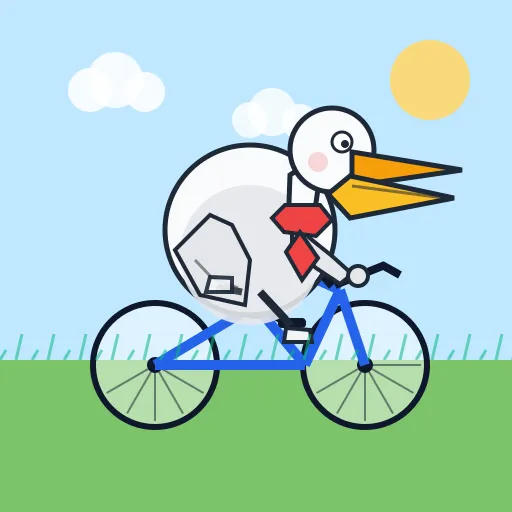
data/pelican-advanced.png

These results took 3-4 iterations. The model saw each output and refined its code. That’s the power of programmatic tool calling: the model can observe and improve, rather than hoping a single generation is correct.
Possible improvements to this particular agent
- Human in the loop: Let a human review the output and provide feedback. The agent refines based on that input.
- Subagents for layers: One subagent draws the background, another the pelican, etc.
- Save code, not images: Store the code that generates the image rather than the PNG. More compact, resolution-independent, and editable.
- LLM-as-judge evaluation: Build a test suite that generates outputs and uses a separate evaluator agent to score them. Useful for benchmarking new models, catching regressions during refactors, or validating behavior before production deploys.
Drawbacks
In production environments, you need a way to sandbox the generated code, as all current LLMs are susceptible of being prompt injected. Also, the generated code could just throw, could return anything, could have an infinite loop that breaks your server or make you have an unexpected vercel bill. There’s services like daytona, cloudflare sandbox (beta) or vercel sandbox that make this easy, but now you are introducing unavoidable latency between your server code and the service. Traditional json tool calling will always be way simpler to implement.
Conclusion
The beauty of programmatic tool calling is that it is extremely flexible and very token efficient. Code will always compose better than a hacky json syntax to define functions. I haven’t tested this, so take this with a grain of salt, but I believe that the performance of the model should decline much less if we add many more methods to the interface. It makes sense though! LLMs can explore hundreds of functions and give very reasonable outputs, why couldn’t they scale the same way when providing a typescript interface as the tool definition?
The full agent source code is available on GitHub.